Showing posts with label pattern. Show all posts
Showing posts with label pattern. Show all posts
Tuesday, 20 December 2016
Qmobile X2i 3G Pattern Lock Solution By Hard Reset Procedure
Qmobile X2i 3G Pattern Lock Solution By Hard Reset Procedure
Qmobile X2i 3G Pattern Lock Solution By Hard Reset Procedure
Today we discuss how to reset pattern lock, Google Account of Qmobile X2i 3G Model. Hard reset of Qmobile X2i 3G And qmobile x6i 3g hard reset are different from any other Qmobile Model. But we can take same advantages by using thishard reset procedure. As we can remove pattern lock, Password, Google Account from Qmobile X2i 3G. The Qmobile X2i 3G Play runs on Android 4.4.2 so it works like other Android smartphone.

Note:
Your Cellphone battery should charge, and remove SIM And Memory Card. Remember Hard reset procedure of Qmobile X2i 3G will remove all user data from Mobile.
Pictures are attached for your help………….
Turn off mobile
Press and hold volume down Button and then press power button until you see Mobile light on but no display Now Release Power Button. After 15 seconds you will see two options in MMI test mode:

SMT Assemble
This is the main trick of Qmobile X2i 3g hard reset if are able to fine MMI test mode. Some friends do not release power button and Mobile goes to save mode.
Here are two options in test Mode "SMT" and "Assemble", click on SMT for hard reset if you know Pattern lock than click in Assemble.

Now you will see Factory test options select last option which is (Restore the Factory settings)

Click on Restore the factory settings from next option.
You Are Done now your Qmobile X2i 3G will restart automatically.
You can apply this hard reset procedure of Qmobile X2i 3G if your cellphone works slow or gives (memory full close or delete any app) option again and again.
QMobile X2i Spd 7715 Android 4.4.2 Firmware Flash File
100% working tested file with out password :DOWNLOAD
Available link for download

Huawei Y360 Test Hard Reset Unlock cell phone Pattern lock Solution
Huawei Y360 Test Hard Reset Unlock cell phone Pattern lock Solution
Huawei Y360 Test Hard Reset-Unlock cell phone-Pattern-lock-Solution
Huawei Y360, Cara hard reset Huawei Y360 ini sudah di test dan berhasil mengatasi permasalahan seperti Huawei Y360 lupa pola kunci, Huawei Y360 lupa PIN, Huawei Y360 lupa Sandi.

Buat Anda pengguna Huawei Y360 mengalami permasalahan sama seperti diatas, Lupa kode keamanan Huawei Y360, Cara hard reset Huawei Y360 ini wajib Anda coba, Dengan cara hard reset Anda dapat dengan mudah mengatasi permasalahan kode keamanan di Huawei Y360 dan dapat juga diguankan utuk memulihkan permasalahan software Huawei Y360 seperti gangguan pada Aplikasi dan Game di Huawei Y360.
Sangat disarankan buat Anda pengguna Huawei Y360 melakukan hard reset Huawei Y360 sebelum Anda memberikan atau menjual Huawei Y360 kepada orang lain, Dengan melakukan hard reset Huawei Y360 dapat menghapus data dan informasi Anda yang pernah disimpan atau digunakan di Huawei Y360.
Buat Anda pengguna Huawei Y360 dan ingin melakukan hard reset Huawei Y360, Selengkapnya cara hard reset Huawei Y360 dapat Anda lihat dan ikuti dibawah ini.
Sangat disarankan buat Anda pengguna Huawei Y360 melakukan hard reset Huawei Y360 sebelum Anda memberikan atau menjual Huawei Y360 kepada orang lain, Dengan melakukan hard reset Huawei Y360 dapat menghapus data dan informasi Anda yang pernah disimpan atau digunakan di Huawei Y360.
Buat Anda pengguna Huawei Y360 dan ingin melakukan hard reset Huawei Y360, Selengkapnya cara hard reset Huawei Y360 dapat Anda lihat dan ikuti dibawah ini.
Cara hard reset Huawei Y360
- Pastikan daya baterai masih mencukupi untuk melakukahn hard reset Huawei Y360
- Huawei Y360 harus daam kondisi Off
- Matikan Huawei Y360 jika Huawei Y360 belum dimatikan
- Masuk ke recovery mode Huawei Y360 dengan cara tekan dan tahan tombol Volume Up + Power secara bersamaan sampai masuk ke menu recovery
- Untuk navigasi menu recovery Huawei Y360 gunakan tombol volume dantombol power untuk OK
- Pilih wipe data/ factory reset dan konfirmasi pilih yes -- delete all user data
- Pilih wipe cache partition
- Pilih reboot system now
- Huawei Y360 akan melakukan restart dan akan kembali nyala setelah proses restart selesai.
Sekianlah cara hard reset Huawei Y360 yang dapat kami share buat Anda pengguna Huawei Y360 maupun Anda pengunjung blog repairsponsel.com ini, Semoga cara hard reset Huawei Y360 dapat berguna dan tentunya dapat mengatasi permasalhan yang Anda alami di Huawei Y360. Selamat mencoba dan semoga berhasil
Available link for download
Thursday, 27 October 2016
Asus Zenfone Z00SD Hard Reset Unlock cell phone Pattern lock Solution
Asus Zenfone Z00SD Hard Reset Unlock cell phone Pattern lock Solution
Asus Zenfone Z00SD Hard Reset-Unlock cell phone-Pattern-lock-Solution
Asus Zenfone Z00SD dari menu recovery mode, Cara ini sudah kami test pada Asus Zenfone Z00SD lupa pola kunci dan berhasil. Selain untuk mengatasi permasalahan seperti Asus Zenfone Z00SD lupa pola, Cara hard reset ini dapat juga digunakan untuk pemulihan Asus Zenfone Z00SD dari kerusakan software atau kesalahan saat penggunaan Asus Zenfone Z00SD.
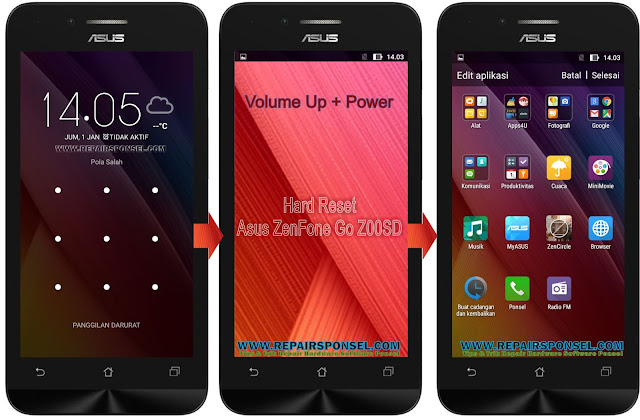
Buat Anda pengguna Asus Zenfone Z00SD yang ingin melakukan hard reset Asus Zenfone Z00SD dari menu recovery mode, SIlahkan lihat dan ikuti cara hard reset Asus Zenfone Z00SD dibawah ini.
Hard Reset Asus Zenfone Z00SD
- Asus Zenfone Z00SD harus dalam kondisi Off
- Matikan Asus Zenfone Z00SD jika Asus Zenfone Z00SD belum dimatikan
- Tekan dan tahan tombol Volume Up + Power secara bersamaan sampai masuk ke select boot mode, Setelah itu pilih Recovery (Gunakan tombol volume up untuk navigasi dan volume down untk OK), Jika muncul logo Android, Silahkan tekan tombol Volume Up + Power untuk melanjutkan masuk ke menu recovery mode Asus Zenfone Z00SD
- Untuk navigasi di menu recovery Asus Zenfone Z00SD gunakan tombol volume dan tombol power untuk OK
- Pulih wipe data factory reset dan konfirmasi pilih yes -- delete all user data
- Pilih wipe cache partition
- Pilih reboot system now
- Asus Zenfone Z00SD akan melakukan restart
- Tunggu proses restart sampai selesai, Setelah proses rastart selesai Asus Zenfone Z00SD kembali nyala dan siap untuk digunakan kembali.
Jika Anda berhasil melakukan hard reset Asus Zenfone Z00SD dari menu recovery dengan cara wipe data factory reset, Sekarang Setelan, Data Asus Zenfone Z00SD tentunya sudah dalam konsidisi seperti baru dari pabrik. Sekianlah cara hard reset Asus Zenfone Z00SD yang dapat kami share, Selamat mencoba
Available link for download
Saturday, 8 October 2016
Htc 526G Read pattern Done One Click With Miracle Box And Miracle Key ver 2 35A Beta Test Reports
Htc 526G Read pattern Done One Click With Miracle Box And Miracle Key ver 2 35A Beta Test Reports
Htc 526G Read pattern Done One Click With
Miracle Box And Miracle Key ver 2.35A (Beta Test Reports)

Available link for download
Monday, 3 October 2016
How To Nokia Lumia 1520 Restore Factory Hard Reset Remove Pattern Lock
How To Nokia Lumia 1520 Restore Factory Hard Reset Remove Pattern Lock

Before you buy a new cell phone or a new tablet, try the following procedure to repair your appliance. Charge first battery, make backups of your important data, if possible, and in most cases, remove SIM and SD card. Unable to recover data after performing a hard reset, Internet backup is always important. For all data, a backup should be performed on an external device, hard disk or system support band. With or without insurance, if your lost cell phone, damaged or stolen, at least, is a backup copy of your valuable data in a safe place.
Nokia Lumia 1520 force reboot and factory reset
Press and hold both the Volume down and the Power keys for 15 seconds. Warning! All downloaded apps, messages, all data will be deleted and restored to factory state!
Nokia Lumia 1520 hard reset
First try this to soft reset your Nokia 1520 Lumia. Turn off your Nokia 1520 Press and hold the Volume down and Power buttons until it vibrates, after that you have to release all the keys then phone will vibrate 3 times. All data will be lost!
To hard reset your Nokia Lumia 1520 using key combination – WP8 – Windows Phone 8
Recover your Windows phone 8 phone Nokia Lumia 1520 (WP 7 see below) reset forgotten password Nokia Lumia 1520 phone, unlock your Nokia Lumia 1520
1. Turn your Lumia 1520 off.
2. Press Volume DOWN and keep pressing it while you connect the charger until you see an exclamation mark!.
3. Press – in this order – Volume UP – Volume DOWN – POWER – VOLUME DOWN.
4. Your phone will reset and reboot. Pls be patient during the reset process.
To hard reset your Nokia Lumia 1520 using key combination – WP7 – Windows Phone 7
Turn off your Nokia Lumia 1520. Press and hold the following buttons Camera + Volume down + Power until your phone vibrates, then release only the Power key and keep pressing the Camera + Volume down for a couple of seconds 4-5s until the phone reboots.
Available link for download
Friday, 23 September 2016
How To Download Sony D2533 C3 Pattern Lock File FTF Free
How To Download Sony D2533 C3 Pattern Lock File FTF Free
How To Download Sony Xpera C3 / D2533 Easy Remove Pattern Lock 100% Working FTF File Free
Pattern Lock File Sony C3/ D2533 Full Update Lock File Download Now.Sony C3 Pattern Lock File Download Now.D2533 Download Xperia C3 D2533_19.2.A.0.391_lock remove Free Download Now
Sony C3 D2533 Pattern Lock Remove Hard Reset Solution Keys.Download Sony D2533/C3 Lock File
Sony C3 D2533 Pattern Lock Remove Hard Reset Solution Keys FTF File Easy Remove Pattern Lock

How To Download Link:
http://www.indishare.me/ Download Link
Flash Tools- Download Link
USB Driver- Download Link
How To Setup :


Available link for download
Thursday, 8 September 2016
Asus Zenfone C ZC451CG Hard Reset Unlock cell phone Pattern lock Solution
Asus Zenfone C ZC451CG Hard Reset Unlock cell phone Pattern lock Solution
Asus Zenfone C ZC451CG-Hard Reset-Unlock cell phone-Pattern-lock-Solution
Asus Zenfone C ZC451CG dengan cara hard reset dari Menu Droidboot MODE, Cara hard reset Asus Zenfone C ZC451CG ini hampir sama dengan cara hard reset Android lainnya, Anda dapat masuk ke menu Droidboot mode (pada Android lainnya kita kenal dengan nama recovery mode) dengan cara menekan tombol volume + power secara bersamaan.

Buat Anda pengguna Asus Zenfone C ZC451CG yang mengalami permasalahan pada software Asus Zenfone C ZC451CG, Cara hard reset Asus Zenfone C ZC451CG ini mengkin dapat menyelesaikan permasalahan software yang Anda alami di Asus Zenfone C ZC451CG.
Jika setelah melakukan hard reset, Asus Zenfone C ZC451CG masih mengalami permasalahan software, Cara terakhir yang dapat Anda coba adalah dengan melakukan flashing atau instal ulang OS (Operasi ayatem) Asus Zenfone C ZC451CG. Selengkapnya cara hard reset Asus Zenfone C ZC451CG dapat Anda lihat dan ikuti dibawah ini.
Cara Hard Reset Asus Zenfone C ZC451CG
- Asus Zenfone C ZC451CG harus dalam kondisi Off
- Matikan Asus Zenfone C ZC451CG jika Asus Zenfone C ZC451CG belum dimatikan
- Tekan dan tahan tombol Volume Up Power secara bersamaan sampai asuk ke DROIDBOOT MODE.
- Untuk navigasi gunakan tombol volume dan tombol power untuk OK
- Selanjutnya pilih Factory Reset
- Asus Zenfone C ZC451CG akan melakukan reset dan restart
- Tunggu proses reset Asus Zenfone C ZC451CG sampai selesai, Jika proses reset Asus Zenfone C ZC451CG telah selesai. Asus Zenfone C ZC451CG akan nyala dengan sendiriinya.
Setelah Asus Zenfone C ZC451CG kembali nyala, Sekarang ANda tinggal menyelesaikan setelan awal sebelum menggunakan Asus Zenfone C ZC451CG seperti memilih bahasa yang akan digunakan, dst sampai selesai..
Sekianlah cara hard reset Asus Zenfone C ZC451CG uyang dapat kami share buat Anda pengguna Asus Zenfone C ZC451CG maupun penggunjung blog repairsponsel.com ini, Selamat mencoba dan semoga berhasil
Available link for download
Subscribe to:
Posts (Atom)