Tuesday, 30 August 2016
Kumpulan Stock Rom SPC Mobile
Kumpulan Stock Rom SPC Mobile
==========>All Tipe Stock Rom SPC Mobile <============
=====================================================

Stock ROM SPC P1 Fusion MT6577
SPC P1 Fusion Part1
SPC P1 Fusion Part2
SPC P1 Fusion Part3
"Not Free/Tidak Gratis"
Stock ROM SPC P2 Opera MT6577
SPC P2 Opera Part1
SPC P2 Opera Part2
SPC P2 Opera Part3
"Not Free/Tidak Gratis"
Stock ROM SPC P5 Opera MT6577
SPC P5 Opera Part1
SPC P5 Opera Part2
"Not Free/Tidak Gratis"
Stock ROM SPC P6 Software MT6577
SPC P6 Software Part1
SPC P6 Software Part2
"Not Free/Tidak Gratis"
Stock ROM SPC S1 Coral SC8810
SPC S1 Coral_SC8810 PAC File
"Not Free/Tidak Gratis"
Stock ROM SPC S1 Link SC6820
SPC S1 Link PAC File
SPC S1 Link New TP PAC File
SPC S1 Link Old TP PAC File
"Not Free/Tidak Gratis"
Stock ROM SPC S2 Carrera SC6820 1
SPC S2 Carrera_SC6820 PAC File
SPC S2 Carrera_SC6820gb PAC File_1
SPC S2 Carrera_SC6820gb PAC File_2
"Not Free/Tidak Gratis"
Stock ROM SPC S3 Carrera SC6820
SPC S3 Carrera_SC6820 PAC File
"Not Free/Tidak Gratis"
Stock ROM SPC S3 Light MT6577
SPC S3 Light Part1
SPC S3 Light Part2
Password RAR Download
Stock ROM SPC S3 Revo MT6572
SPC S3 Revo Part1
SPC S3 Revo Part2
SPC S3 Revo Part3
SPC S3 Revo Part4
Password RAR Download
Stock ROM SPC S3 Revo MT6572_1408171738 Read BIN
SPC S3 Revo Part1
SPC S3 Revo Part2
Password RAR Download
Stock ROM SPC S5 Maxx SC6820
SPC S5 Maxx_SC6820 PAC File
"Not Free/Tidak Gratis"
Stock ROM SPC S7 Arena MT6589
SPC S7 Arena Part1
SPC S7 Arena Part2
SPC S7 Arena Part3
SPC S7 Arena Part4
"Not Free/Tidak Gratis"
Stock ROM SPC S7 Neo Broadcom
SPC S7 Neo Part1
SPC S7 Neo Part2
SPC S7 Neo Part3
"Not Free/Tidak Gratis"
Stock ROM SPC Yang lainnya sedang dalam proses upload,kunjungi terus s4tri0.blogspot.com untuk Stock ROM SPC Selanjutnya.......
---------------------------------------------------------------------------------------------------
Password RAR "Not Free" : PM / INBOX Facebook Admin
---------------------------------------------------------------------------------------------------
Perhatikan : Jika Stock ROM diatas ada yang bermasalah harap inbox atau comment...
---------------------------------------------------------------------------------------------------
eDu Cells
To be continue...
Next Page : Cara Flash MTK Android Via SPFlashTool
Cara Flashing Android Spreadtrum SC6820-8810
Available link for download

DOWNLOAD FREE MOBILE FLASH TOOL 2016
DOWNLOAD FREE MOBILE FLASH TOOL 2016

7-zip
Adb & fastboot setup
universal android driver
MTK 65XX Drivers
MTK VCOM Drivers
Spreadtrum Driver
Pdanet
motorola driver
samsung drivers
LG Drivers
SP FLASH TOOLS
infinix flash tools
infinity nokia best
nokia pc suite
MTK DROID TOOLS
odin (samsung )
iROOT
GPG dragon
flash tools (sony xperia)
mega link downloder
LG Flash Tools
Nokia X Flash tools
SPD uprade tools (itel)
RSD Lite (motorola)
SPD write IMEI tools
Available link for download
How to Install iOS 7 Custom ROM on Samsung Galaxy Y
How to Install iOS 7 Custom ROM on Samsung Galaxy Y
To do This you need :

1- CWM Recovery
2- IOS7 custom ROM
Now , What we want to do ??
1- put the ZIP files on your SD card
2- reboot your device into recovery ( power button + Vol+ + Home button )
3- Choose zip from sd card > Install ZIP from sd card > and choose the CWM ZIP and install it >>( if you already have CWM on your device dont do this step ) <<
4- Go to mounts and storage
5 - Mount/data
6- Mount/cache
7- Mount/System
8- Go back
9- Select Advanced > Reboot Recovery ( the Device will reboot to recovery again )
10- Mounts And Storage > Format/System .......... Format/data .............. Format/cache
11-Mount/data ........ mount/system ........... mount/cache
12- Go back
13- install zip from sd card > choose zip from sd card > custom rom Zip file ios7..... And install it
14 - Wait
15- Go back
16 - Wipe data / factory reset
17-reboot system now
18- Wait some moments
Available link for download


How Flash Oppo Joy R1001 SP Flash Tool
How Flash Oppo Joy R1001 SP Flash Tool
This time I want to share how easy reflash the ROM Oppo Oppo Joy R1001 botloop via SP Flash Tool, How To Flash Oppo Joy R1001 has been tested and 100% successful, so for those of you who have Oppo Joy R1001 botloop, Cra flash Oppo Joy R1001 this can and apply to overcome, Before doing Flash Oppo Joy R1001 you must prepare the material for the Flash Oppo Joy Joy R1001 as Driver Oppo R1001, SP Flash Tool and ROM Oppo Joy R1001. Materials needed for flash Oppo Joy R1001 please download below. Materials required for flash Oppo Joy R1001 1. Driver Oppo Joy R1001 2. SP Flash Tool v5144400 3. ROM Oppo Joy R1001
How Flash Oppo Joy R1001 SP Flash Tool
- Extract all files that have been downloaded earlier.
- Install Driver Oppo Joy R1001
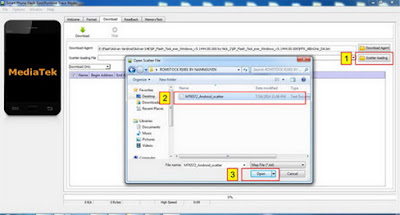
- Open or run the SP Flash Tool, On Scatter loading please load Oppo Joy R1001 files that have been downloaded and extract the computer as shown below.
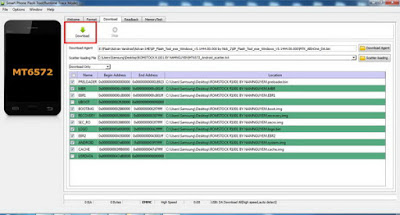
- Next Click Download to begin the process of Flash ROM Oppo Joy R1001, Press Volume Up (Volume Up the BOOT button Flash Oppo Joy R1001) and R1001 Joy Oppo connect to a computer via USB.
- Oppo Joy R1001 Flash process will take several minutes, If Flash Oppo Joy R1001 is finished it will display a dialog box Download OK as shown below.
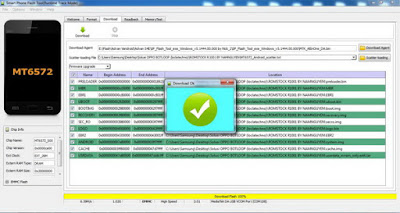
- Flash process Oppo Joy R1001 via SP Flash Tool is complete.
Problems often arise when the flash Oppo Joy R1001
1. Some of the errors that frequently arise when performing flash Oppo Joy R1001 as after click the Download button and the error message appears Oppo Joy R1001 Flash process is not running, how to handle it can be done by filling the files Uboot with uboot.bin and USER DATA with userdata_nvram_only.ext4 If you are using Firmware Oppo Joy R1001 R1001 ROMSTOCK BY NAMNGUYEN, As the picture below. and mark all file columns in SP Flash Tool, then click Download.
2. If the flash Oppo Joy R1001 is still not able to walk, Try changing the selection in the columnDownload Only become Firmware Update or Format ALL + download and click the Download button to continue the process of flash Oppo Joy R1001. 3. Process Flash Oppo Joy R1001 botloop completed and open and replace the battery, Turn Oppo Joy R1001, If the current at switch on screen Oppo R1001 appears Encryption unsuccessful please click on the Reset phone , and wait for the reset process Oppo Joy R1001 to completion, Oppo Joy R1001 successful return can be used normally. Congratulations you succeed .... 4. Weve also experienced Flash Oppo Joy R1001 via SP Flash Tool, After flash Oppo Joy R1001 successful and when turned on only vibrate, In that case we have not been able to find out what the cause, if you know please add it here. 5. Before doing flash Oppo Joy R1001 via SP flash tool should you do flash Oppo Joy R1001 without a PC below to avoid After the flash Oppo Joy R1001 successful and when turned on only vibrate, Karna in some cases we have always successfully upgrade the OS Oppo Joy R1001 botloop without a PC, please follow the way here if Oppo Joy R1001 could still get into recovery mode menu here how to flash Oppo Joy R1001 without PC See also here how to Restore Invalid IMEI Oppo Joy R1001and that is all the way flash Oppo Joy R1001 to resolve Oppo Joy R1001 botloop, hopefully means flash Oppo Joy R1001 can solve your problems and good luck.
Available link for download
Subscribe to:
Posts (Atom)